ConvertDuck

Make US Passport Photo

Generate a compliant 2x2 inch biometric photo strictly adhering to US Department of State passport regulations.

Upload PhotoJPG, PNG

Official Passport Standard

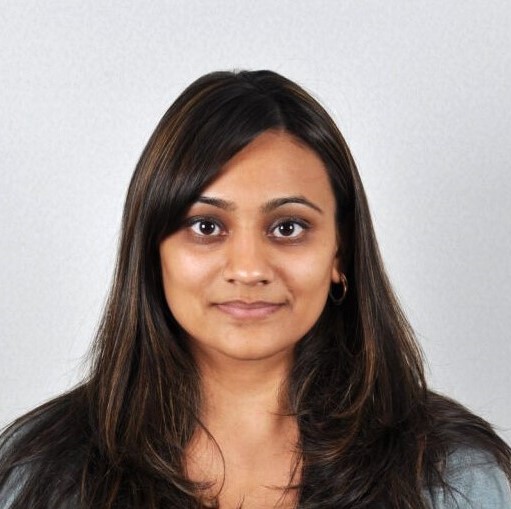
Standard Example

Biometric Alignment

  • 1

    Center your head

    Face the camera directly with no tilting.

  • 2

    Align eyes with the guide

    Eyes must be open and level.

  • 3

    Fit face within the oval

    Head must be between 1" and 1 3/8".

Technical Specifications

Our algorithm automatically handles resolution and dimensions.

Dimensions2 x 2 inch (51 x 51 mm)
BackgroundPlain White / Off-white
Resolution300 DPI (High Quality)
File TypeJPG / JPEG

Avoid Rejection

  • Remove eyeglasses

    Glasses are strictly prohibited (medical exceptions only).

  • Use plain white background

    No shadows, textures, or lines allowed.

  • Neutral expression only

    Keep mouth closed and eyes open.

  • No digital retouching

    Do not use filters or alter facial features.

  • Everyday clothing

    No uniforms or camouflage attire.

Detailed Guidelines for US Passport Photos

Follow these official Department of State rules to ensure your application is accepted without delay.

Quick Check: Do's & Don'ts

No Eyeglasses

You must remove glasses, even for daily wear. Glare often obscures the eyes.

No Shadows

Avoid shadows on your face or the background. Use even lighting.

No Uniforms

Do not wear military or professional uniforms. Wear normal street clothes.

Neutral Expression

Face the camera directly with a neutral look or a natural smile. Eyes must be open.

Plain White Background

The background must be completely white or off-white with no texture or lines.

No Digital Retouching

Do not use filters, AI tools, or apps to alter your appearance.

Attire & Accessories

Strict rules regarding glasses, headwear, and clothing choices.

The most critical rule for US passport photos is that eyeglasses are not allowed. You must remove them before taking the photo, even if you wear them every day. If you cannot remove them for medical reasons, you must submit a signed statement from your doctor with your application.

Wear your normal daily clothing. Do not wear uniforms, clothing that looks like a uniform, or camouflage attire. You should also avoid wearing white clothing, as it may blend into the white background and cause your head to look like it is floating.

Hats and head coverings are generally prohibited. However, if you wear a head covering for religious or medical purposes, you may keep it on provided you submit a signed statement. Even then, your full face must be visible, and the covering must not cast any shadows on your face.

Pose & Expression

How to position your face and body for a biometric-compliant photo.

You must face the camera directly with your head centered in the frame. Do not tilt your head to the side, up, or down. The goal is to capture a full-frontal view of your face, ensuring your facial features are clearly visible for identity verification.

Maintain a neutral facial expression or a natural smile with both eyes open. It is generally safer to keep your mouth closed to avoid showing teeth, although a natural smile is technically permitted. Exaggerated expressions can distort biometric data and lead to rejection.

Your eyes must be fully visible. Ensure that hair does not cover your eyes or eyebrows. If you have long bangs, sweep them to the side so your entire eye area is unobstructed.

Lighting & Background

Creating the perfect environment for a studio-quality result.

The background must be plain white or off-white. There should be no patterns, objects, textures, or lines visible behind you. A white sheet or a plain white wall works best. Ensure the background is free of shadows.

Lighting is crucial for a successful photo. Position yourself so that the light is even across your face. Avoid side lighting or strong overhead lights that create shadows under your eyes, nose, or chin. Shadows on the background are also a common cause for rejection.

Photo Quality & Digital Rules

Technical specifications regarding resolution, filters, and editing.

Do not digitally alter your photo. The use of social media filters, AI generation tools, or retouching apps to smooth skin or change features is strictly prohibited. The photo must be an accurate representation of how you look right now.

The photo must be in color, sharp, and correctly exposed. Blurry, grainy, or pixelated images will be rejected. If you are printing the photo, it must be on matte or glossy photo-quality paper without any holes, creases, or smudges.

Make US Passport Photo Online (2x2 Inch)

Instantly create a biometric compliant 2x2 inch US passport photo. Our AI removes the background and crops your image to meet strict Department of State requirements.

Get Your Passport Photo in 3 Steps

1. Upload Your Photo

Select a recent photo (taken within the last 6 months) from your gallery or take a new one.

Stand 3-4 feet away from the camera to avoid fisheye distortion.

2. AI Auto-Crop & Check

Our tool automatically removes the background and centers your face to the 1 inch - 1 3/8 inch head size requirement.

Ensure your eyes are fully open and mouth is closed.

3. Download & Print

Save the high-quality image (JPEG/PNG) and print it on 4x6 inch paper or submit it for online renewal.

Do not digitally retouch your appearance.

Why Use ConvertDuck?

  • ✓ Instant Background Removal

    Replaces any background with the required plain white or off-white color automatically.

  • ✓ Biometric Compliance

    Ensures the head size aligns strictly between 1" and 1 3/8" as mandated by US regulations.

  • ✓ Print-Ready Layouts

    Download a single digital file or a printable sheet for Walgreens, CVS, or home printers.

US Passport Photo Requirements

Photo Size 2 x 2 inches (51 x 51 mm)
Head Size 1 - 1 3/8 inches (25 - 35 mm)
Background Plain white or off-white, no shadows
File Format JPG/JPEG or PNG
Resolution 300 DPI (High Quality)

Common Questions

Q. Can I wear glasses in my US passport photo?
No. You must remove eyeglasses, sunglasses, or tinted glasses. If you cannot remove them for medical reasons, you must include a signed note from your doctor with your application.
Q. Can I smile in the photo?
You may have a natural smile, but a neutral facial expression with both eyes open and mouth closed is preferred and safest to avoid rejection.
Q. How do I take a photo of my baby?
Lay your baby on a plain white sheet or cover a car seat with one. Ensure there are no shadows on the face. It is acceptable if an infant's eyes are not entirely open.
Q. What should I wear?
Wear normal daily clothing. Uniforms and camouflage are strictly prohibited. Religious headwear is allowed if worn daily, but it must not hide your face or cast shadows.