ConvertDuck

Make India Visa Photo

Generate a compliant 2x2 inch (51x51mm) biometric photo for Indian Online Visa and VFS applications. Our tool strictly adheres to official Government of India requirements.

Upload PhotoJPG, PNG

Official Standard

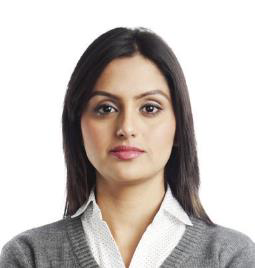
Standard Example

Biometric Alignment

  • 1

    Align eyes within the orange zone

    Eyes must be strictly level and open.

  • 2

    Fit head inside the blue oval

    Ensure face is visible from chin to top of hair.

  • 3

    Keep head straight

    Do not tilt or rotate your head.

Technical Specifications

ConvertDuck automatically handles resolution, background, and dimensions.

Dimensions51x51mm (2x2 inch)
BackgroundPlain White
Resolution300 DPI
Head Height25mm - 35mm

Avoid Rejection Checklist

  • Remove glasses

    Glasses are strictly prohibited in India Visa photos.

  • Ensure background is plain white

    No shadows, patterns, or objects in background.

  • Remove shadows from face

    Ensure balanced lighting on both sides of face.

  • Keep a neutral expression

    Mouth closed, eyes open, looking straight.

Detailed Guidelines for India Visa Photos

Follow these official specifications to ensure your Indian visa application is processed without delay.

Quick Check: Do's & Don'ts

No White Clothes

Do not wear white clothing. It blends with the background.

No Shadows

Ensure there are no shadows on your face or on the wall behind you.

Colored Attire

Wear a medium-colored shirt (e.g., blue) to contrast with the background.

Neutral Expression

Mouth closed, eyes open, and looking directly at the camera.

Attire & Accessories

Important rules about clothing colors and eyewear.

Unlike many other countries, India specifically advises against wearing pure white clothing because the background must be white or light-colored. You should wear colored attire, such as a medium blue shirt, to create a clear contrast between your shoulders and the background. Avoid heavily patterned or textured fabrics that might distract from the face.

Regarding eyewear, prescription glasses are permitted only if they are thin-framed and do not obstruct the eyes. However, strict rules apply: there must be absolutely no glare on the lenses, and the frames must not cover any part of the eyes. Sunglasses and tinted glasses are strictly forbidden. If you can see without them, it is safer to remove glasses to avoid rejection due to reflections.

Head coverings are not permitted unless worn for religious reasons. If a religious head covering is worn, it must not cast any shadows on the face. The full face, from the bottom of the chin to the top of the forehead and both edges of the face, must be clearly visible.

Facial Expression & Posing

How to position yourself for the perfect shot.

The photo must capture a full frontal view of your face with your eyes open, level, and clearly visible. You must look directly at the camera lens, not down or to the side. The head should be centered within the frame, extending from the top of the hair to the bottom of the chin.

You must maintain a natural, neutral expression. This means your mouth should be closed, and you should not be smiling, frowning, or raising your eyebrows. The goal is to provide a clear biometric representation of your features without distortion.

Lighting & Background

Avoiding common lighting errors.

The background must be plain white or a light color. Do not use backgrounds with patterns, designs, or dark colors. A common reason for rejection is a background that is not sufficiently illuminated, causing it to look gray or uneven.

Lighting must be even and balanced across the face to avoid shadows. There should be no shadows in the eye sockets, under the nose, or under the chin. Furthermore, there must be no distracting shadows cast on the background behind your head. Using diffuse lighting sources helps eliminate these issues.

Infants & Children

Relaxed rules for young applicants.

For children under ten years of age, the requirements for facial height and eye position are somewhat relaxed. However, the child must still be the only subject in the photo. No toys, chair backs, or other people (including parents' hands) should be visible in the frame.

Babies under one year old do not strictly need to have their eyes open, though it is preferred. For infants, ensuring a neutral expression and a closed mouth is difficult, so the rules are applied with some flexibility. The most important factor is a clear frontal view of the child's face.

India Visa Photo Maker Online (2x2 inch | 51x51mm)

Generate a 100% compliant Indian Visa or OCI photo instantly. Our AI tool automatically crops your image to 51x51mm and sets the background to plain white as per VFS Global standards.

How to Make an Indian Visa Photo

1. Upload Photo

Take a photo with your phone against a wall and upload it.

Ensure your head is not tilted and eyes are open.

2. AI Processing

We crop to 2x2 inches and remove the background instantly.

The tool centers your face to meet the 25-35mm head height rule.

3. Download

Get a JPEG file ready for online upload (10KB - 1MB).

Printable versions are also available.

Why Use Our India Visa Photo Tool?

  • ✓ Exact 51x51mm Size

    Precise resizing to meet the strict 2x2 inch requirement.

  • ✓ White Background

    AI automatically replaces complex backgrounds with plain white.

  • ✓ File Size Optimized

    Outputs JPEG images under 1MB for smooth uploading.

India Visa Photo Requirements

Dimensions 2 x 2 inches (51 x 51 mm)
Face Height 1 inch to 1 3/8 inches (25mm - 35mm)
Background Plain light-colored or white
File Format JPEG (.jpg), Max 1MB

Frequently Asked Questions

Q. Can I wear glasses in my Indian Visa photo?
Generally, no. You should remove glasses to avoid glare. Thin frames are allowed only if medically necessary, but sunglasses are strictly forbidden.
Q. What clothing should I wear?
Wear colored attire. Do not wear pure white clothes (blends with background) or patterned/textured outfits. Uniforms are not allowed.
Q. Do babies need to have eyes open?
For babies under one year, eyes do not have to be open. For older children, eyes should be open and looking at the camera.
Q. Can I smile?
No. You must maintain a natural, neutral expression with your mouth closed.